
How to Check Whether a Tokenized Stock Can Be Used in DeFi and LPs
Task guide Last verified 2026-10-19 5 min read
Seeing a stock token in your wallet is the first step. To use it in DeFi, you also need an application that accepts that exact token on that exact network.
Think of it as a series of doors. The token must be transferable. The application must support its network and contract. If you want to provide liquidity, a suitable pool must exist. Finally, the pool needs real capital and trading activity before it can produce meaningful fees.
DeGate helps with several of these checks. Token Info identifies Ondo and xStocks assets, Trade can look for a live route, and Turbo Range shows the stock pools that users can enter and manage. The Web3 browser also provides quick access to other applications, but each application still decides which token contracts it accepts.
Step 1: Identify the exact token and network
Begin with the full token name, issuer, network, and contract address.
An Ondo token on Ethereum and an xStocks token on Solana may both relate to NVIDIA or Tesla. They are still different assets. A DeFi application that supports one contract has not necessarily added the other.
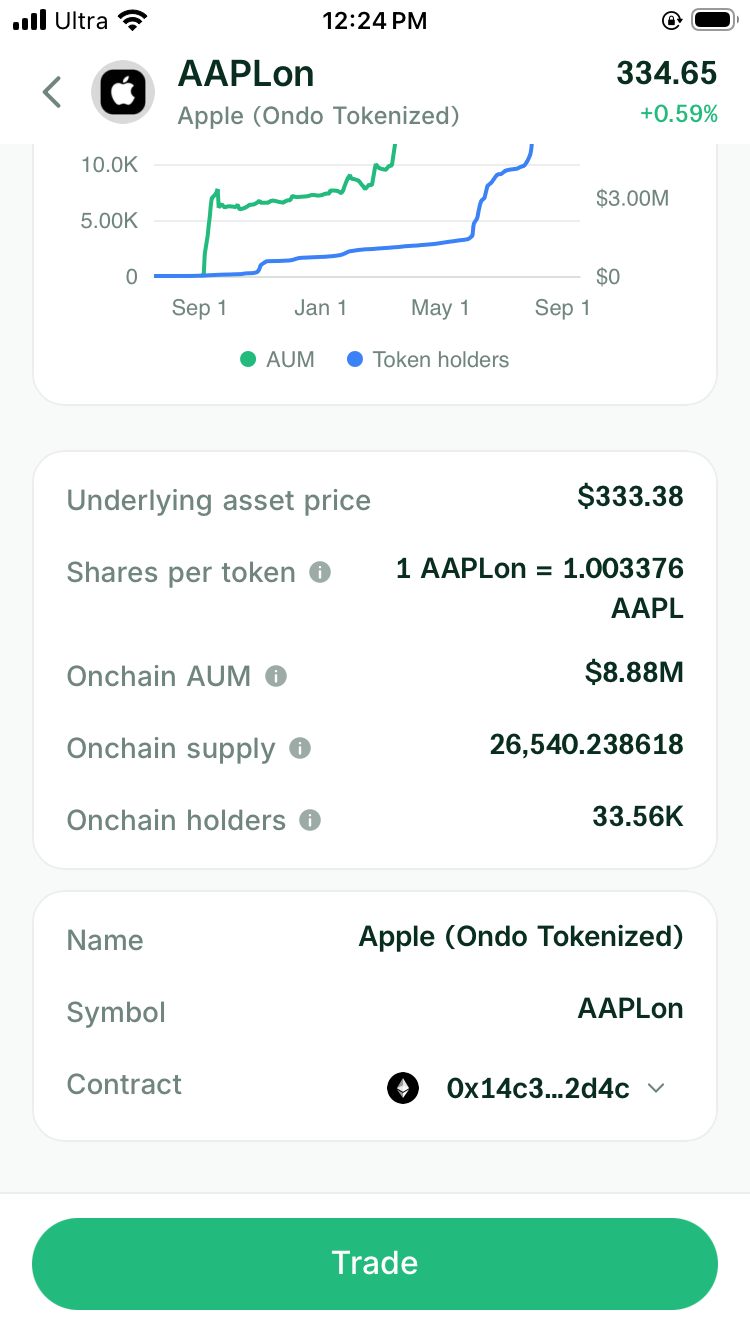
Open DeGate Token Info and copy the contract. Compare it with the issuer’s official asset list. This gives you the exact term to search for in the application or pool directory.
Step 2: Check whether the token can move to the application
Some stock tokens can transfer freely between compatible addresses. Others apply eligibility rules, allowlists, pauses, or limits.
Read the issuer’s transfer rules and check the destination network. If the application runs only on Solana, an Ethereum token cannot be deposited there without an official bridge or another supported conversion path.
In practical terms, the wallet and the application need to meet on the same network. A familiar ticker does not bridge the asset for you.
Step 3: Find a page where you can make the deposit
Open the DeFi application and search for the full token name or contract address.
For a lending market, look for an active supply or collateral page. For an LP, look for a pool with the correct stock token and paired asset. For a vault or structured product, read the deposit token shown in its current interface.
Do not rely on a price chart or asset description alone. When the application supports the token, the page should show the exact network and contract, together with a working deposit and withdrawal flow. A page with price information but no deposit button or pool does not yet let you use the token in that application.
Some applications accept a different version specified by the issuer. In that case, the page will usually name the required token and contract. Compare that address with DeGate Token Info and the issuer’s asset list. You do not need to inspect the code yourself.
DeGate’s Web3 browser can open applications such as Aave and Kamino from the same wallet. That makes access easier. The next check still happens inside the selected application because its markets can change independently.
Step 4: Check whether Turbo Range supports the exact asset
An LP needs a pool for the exact pair. Turbo Range uses one position flow for eligible Ondo assets on Ethereum and handles the underlying pool state when the position is submitted. A stock token that can be held or traded does not automatically qualify for this LP flow.
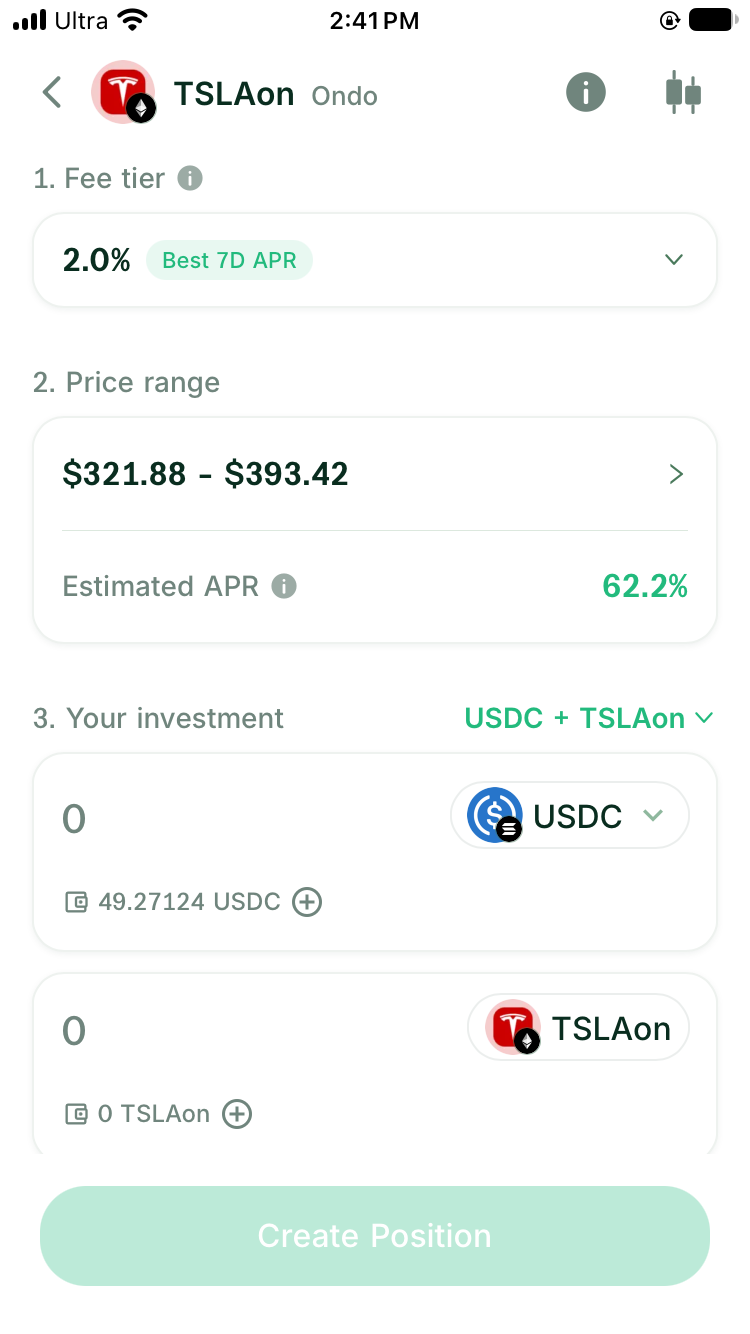
Open Turbo Range and search for the exact asset. Confirm that the setup identifies Ondo, Ethereum, USDC, the fee tier, price range, and closing flow. If the pool is new, remember that it begins without prior pool volume. Fees arrive only when users trade through active liquidity in that pool.
The screenshot below shows the current TSLAon/USDC setup in Turbo Range. The LP is on Ethereum. The Solana badge beside USDC identifies the funding source, which can differ from the LP network. Check support separately for another issuer, contract, or LP network.
Step 5: Check whether the market is active enough for your purpose
For an existing LP pool, read:
- total liquidity in the pool
- recent swaps or trading volume
- paired asset
- fee tier
- price range
- how to claim and close
A pool with little capital may move sharply when someone trades. A pool with no recent swaps may generate little fee income. In other words, “the pool exists” and “the pool is useful for my position” are two different conclusions.
For lending, check how much users have supplied and borrowed and whether withdrawals are currently available. For any market, start with an amount that lets you test the full deposit and exit flow.
A quick DeGate check
Before you commit capital
- Open the stock in DeGate Token Info.
- Confirm the issuer, network, and contract.
- Open Turbo Range and search for the exact asset.
- If a pool is present, read its liquidity, recent activity, pair, range, and close flow.
- Choose how to deposit. With USDC alone, you can use one-sided funding and let the system prepare the stock-token side shown in the preview. If you already hold both assets, you can use two-sided funding. A manual swap is not required before opening the position.
- For another DeFi use, open the application from the Web3 browser and search the same contract there. If that application requires you to hold the token first, request a quote for the amount you need.
This order lets you confirm that Turbo Range or the third-party market supports the exact token before you decide whether to buy it separately. It avoids buying one issuer’s version and later finding that the intended market supports another.
FAQ
If DeGate can hold a stock token, can I use it in Turbo Range?
Only when Turbo Range supports that exact token and network for LP use. Eligible Ondo assets on Ethereum use the same position flow regardless of the underlying pool state. Holding, trading, and LP support are separate product capabilities.
Why does the network matter if the stock name is the same?
DeFi applications read blockchain contracts. An Ethereum contract and a Solana token address are different assets from the application’s point of view.
Does a token price page mean I can deposit the token?
No. A price page only shows that the application can display market data. A usable market also needs a deposit, lending, or LP entry with the correct network and contract address.
Does an Ondo RFQ (Request for Quote) mean an Ondo LP already exists?
No. An RFQ gives a price for one specific buy or sell order and can connect that order to the price and available liquidity of the underlying US stock. The trade therefore does not depend entirely on an existing on-chain pool. An RFQ can prepare the assets and provide a price reference for an eligible Turbo Range position, but the LP still supplies the pool capital.
Can I use DeGate with third-party DeFi applications?
Yes. DeGate has a Web3 browser and in-app entry points for several applications. The selected application must still support the exact token you want to deposit.
Sources
Facts on this page were last verified on October 19, 2026. Product capabilities, supported assets, and fees can change; the linked sources are the current record.