
Why Can't I Open a Tokenized-Stock LP Position?
Task guide Last verified 2026-10-19 6 min read
You selected a stock token and can see an APR, but the next step has no quote. Or you confirmed the operation and the position still has not appeared. Check where the process stopped before trying again.
Use the table to find the step where you stopped in DeGate Turbo Range. For a missing quote, check the required swap and your input assets. For a submitted operation, check its status before trying again. A warning about a funding swap calls for a quote check; inspect the pool separately to find its on-chain status.
Find where the process stopped
| What you see | Check first | Next action |
|---|---|---|
| The stock is in Trade but missing from Turbo Range | Issuer, network, and current Turbo Range list | Verify the exact token and its stock LP support before buying |
| Available USDC is less than the wallet total | Selected USDC source network | Compare that chain’s balance with the input |
| A swap is required but liquidity is unavailable | Conversion amount and quote availability for that asset | Check issuer status, then request a fresh preview later |
| APR appears but a quote or network-fee estimate is missing | Conversion, funding, and network-fee fields | Investigate the missing field; APR is a historical estimate |
| A submission still shows processing | Original operation record and transaction links | Check the first operation’s status before resubmitting |
| The operation reports failure | Wallet balances, returned assets, and completed steps | Locate the funds and assets before retrying |
Start with the Turbo Range asset list
DeGate Trade supports more stock tokens than the current Turbo Range stock LP flow. When preparing an LP, start with Turbo Range’s asset list.
Open the asset and check its issuer, Ethereum network, and stock/USDC pair. The current stock LP flow uses eligible Ondo assets. Choose the token and follow the opening steps; existing and new pools use the same flow.
If you cannot find the asset, check the contract, issuer, and network of the token you hold. Several tokens may track the same company, so verify the exact one before buying. How to Check DeFi and LP Support explains how to check.
Check the USDC balance on your selected network
Each USDC input selects one source network. You can switch to another available network, and the source network can differ from the stock token’s network.
For a hypothetical example, suppose you hold 80 USDC on one network and 70 USDC on another, totaling 150 USDC. Neither balance is enough for a single 100 USDC input. Turbo Range uses USDC from the selected network for that submission. Check that balance and the amount the app allows you to enter.
Leave room for the network fee shown in the preview. In ordinary supported flows, DeGate can help prepare gas from eligible assets; you still pay the cost. Hardware-wallet users manage gas at their own address. Prepare the native gas asset there, and check the payment asset and balance requested for the transaction before confirming.
If liquidity is unavailable, check the required swap
In the screenshot below, the user entered USDC and needs a stock-token conversion to open the position. The app reports that the U.S. stock market liquidity required for this swap is unavailable. APR is still visible, while the network-fee estimate is missing.
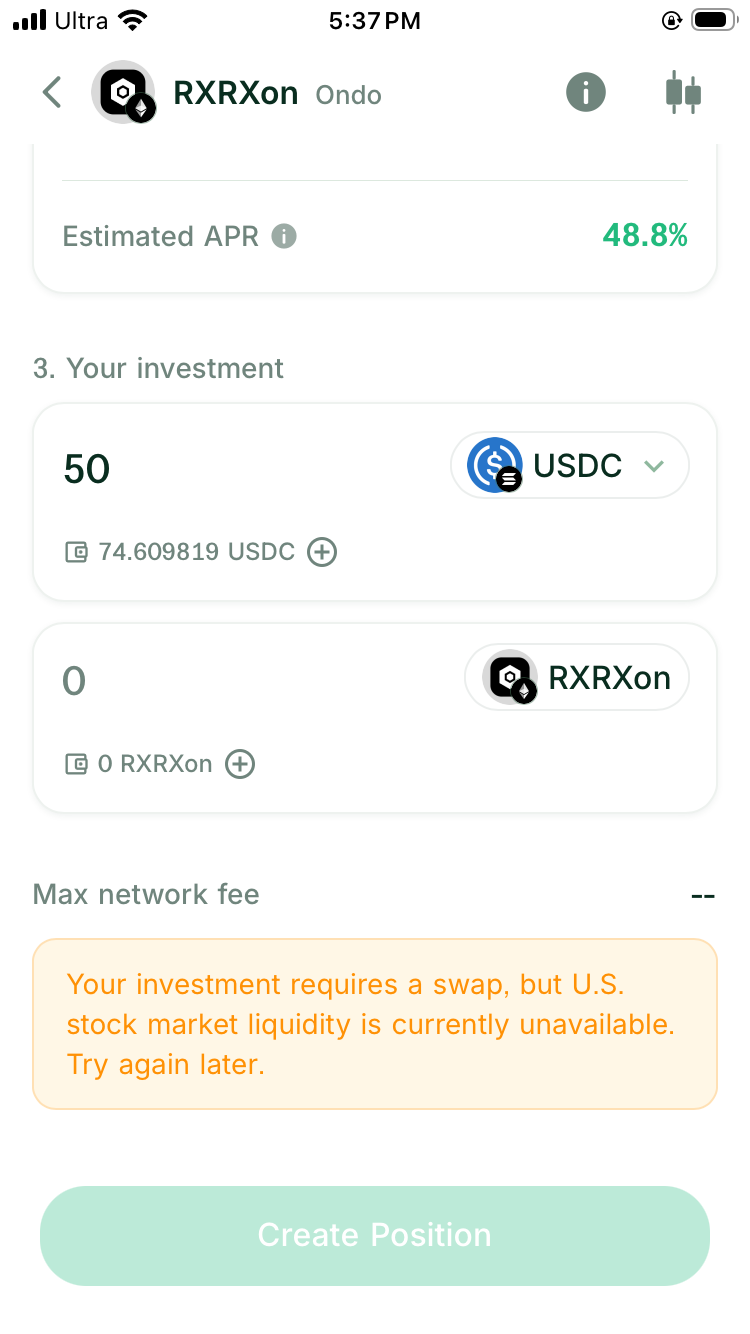
For an eligible Ondo conversion, a solver partner integrated with DeGate can request an RFQ through Ondo’s official API. Quote availability can depend on the asset, market session, order size, current capacity, or a temporary pause.
Find the asset on Ondo’s market status page and check for an issuer pause or interruption. If Ondo shows availability but DeGate still cannot quote the order, record both results so DeGate support can investigate the quote route.
Ondo’s troubleshooting guidance suggests checking status, waiting, or trying a smaller order. If a smaller amount receives a quote, order size may be involved. Add up the costs before splitting your investment into several submissions.
Why do two asset inputs still need a quote?
The current price and selected range determine how much stock token and USDC the position needs. If your input ratio differs, the flow may still need a swap.
Select the two-asset mode and enter your amounts. On the input screen, Auto-swap via U.S. stock market shows any planned conversion. In Review Investment, After auto-swap shows the resulting asset quantities.
If a required conversion has no quote, try reducing the asset you have entered in excess of the required ratio and leaving that excess in the wallet. Request a fresh preview. A deposit that still needs a swap requires a usable conversion quote; a deposit that fits the ratio can proceed without that swap, subject to the remaining opening requirements.
If the underlying pool needs initialization, Turbo Range also needs a fresh external reference price to set its starting price. That step must complete even when you have entered both stock tokens and USDC. If the reference price is unavailable, wait for quotes to return.
How RFQ and On-Chain Stock Pools Work Together explains the requirements for funding conversions, initial pool pricing, and later pool swaps.
Refresh an expired preview before confirming
Quotes expire. Even while the page shows an asset reference price or a Historical APR Estimate, check whether the execution quote is still usable. After changing the amount or range, request a fresh preview and review the input, output, and costs.
For an insufficient balance, use a smaller input or fund the selected source network. For an issuer pause, wait for availability. For an expired quote, request a fresh preview. Changing slippage won’t add funds or restart paused quotes. If the route changes, review the expected assets and costs again.
Check a submitted operation before retrying
If the app shows processing after verification, open the original DeGate operation and check its status and network transaction links. A cross-chain operation can have several steps. After one transaction succeeds, wait for the remaining steps and check that the LP position has opened.
If the app reports failure, check the remaining wallet balance, returned assets, completed conversions, and network fees paid. Write down what completed and what was returned before deciding how to retry.
Once you know the first operation’s status, decide whether to request a new preview and submit again. Repeating an operation while it is pending could let both complete and invest more than you planned.
What to send support if you cannot find the cause
Keep these details before contacting support:
- The exact token, issuer, and network.
- Input amounts and the selected USDC source network.
- Whether the preview required an auto-swap.
- The full error message, time, and time zone.
- App version and the operation or transaction reference, if shown.
- Relevant screenshots with information you do not wish to share removed.
For an operation started in DeGate, use DeGate’s official support entry. Ondo’s documentation also distinguishes users of its own API or app from users trading through another platform and directs the latter to that platform. Provide the operation and transaction records. Keep your wallet password and recovery phrase private, including from support staff.
FAQ
Why does an APR appear if I cannot submit?
APR uses historical conditions. Opening also needs enough current funding, quotes for any required swaps, and a price reference where the pool requires one. Follow the missing fields or messages in the preview to continue checking.
Can I claim fees or close an existing position when RFQ is unavailable?
In the current version of Turbo Range, Claim and closing return the actual assets. Those actions do not first convert the result into USDC, so they do not need a new RFQ for that conversion. Check the preview for network fees and other operation requirements.
Should I keep changing the amount until a quote appears?
Check asset status and the message first. Try a smaller amount to see whether an order-size limit is involved. If trading is paused or the route is interrupted, wait for availability. Before dividing the investment into several submissions, compare all the operation costs.
Can I retry while the first submission is pending?
Check the status of the original operation before submitting again. If both complete, you may invest more than you planned.
Sources
Facts on this page were last verified on October 19, 2026. Product capabilities, supported assets, and fees can change; the linked sources are the current record.