
One-Sided or Two-Sided Deposit: How Auto-Swap Works for a Stock LP
Task guide Last verified 2026-10-19 8 min read
A stock/USDC liquidity position normally needs two assets. When you open DeGate Turbo Range, however, you may hold USDC alone or already have both sides. Under Your investment, choose USDC Only or the two-asset mode, shown for this token as USDC + TSLAon. The second mode displays both input fields.
One-sided funding lets you deposit USDC alone. The position flow converts part of it into the stock token, then puts both assets into the range at the required ratio. Two-sided funding begins with the two assets already in your wallet. It can deposit them directly when the ratio fits, while an excess on either side may still need an auto-swap.
One-sided funding describes the asset you provide, not a USDC-only LP. After the stock LP opens, it still manages the stock token and USDC. Their balances change as traders use the pool.
Enter one asset when you hold USDC only
Select USDC Only for one-sided funding when you have not bought the stock token or want to prepare it within the LP flow.
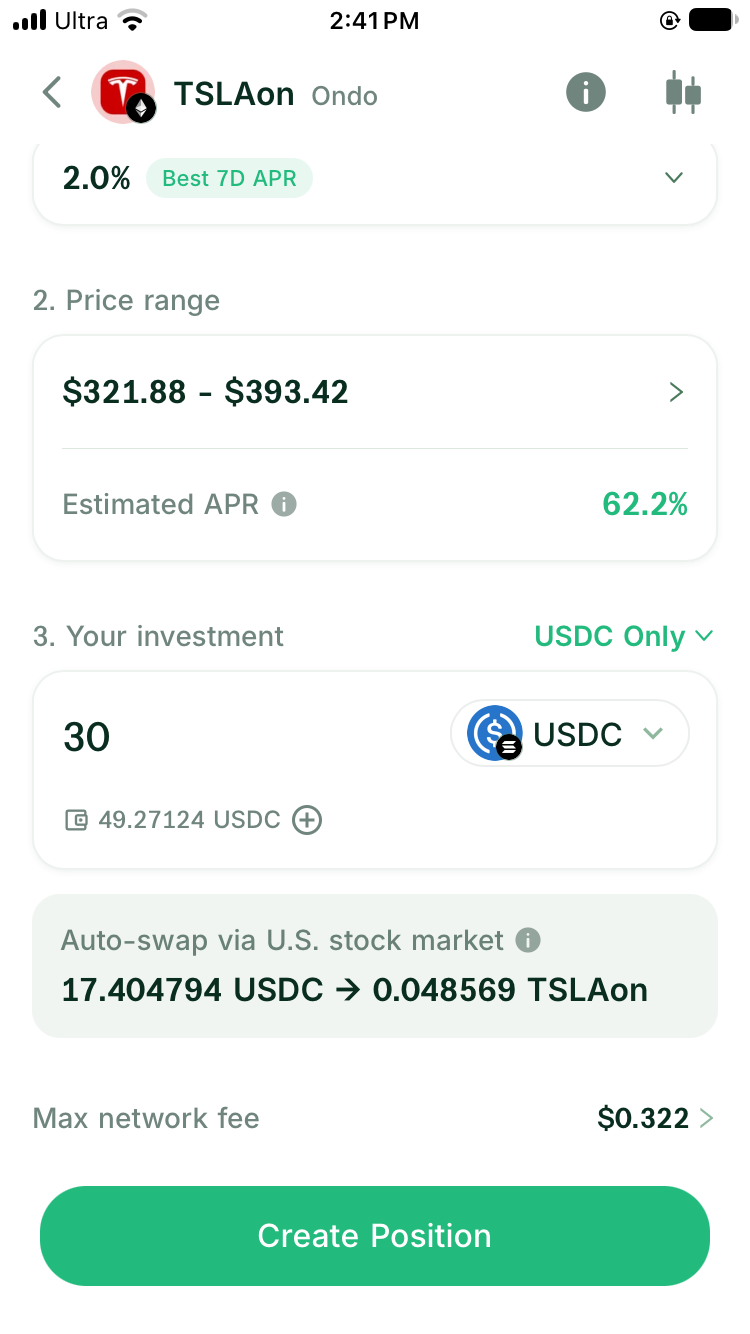
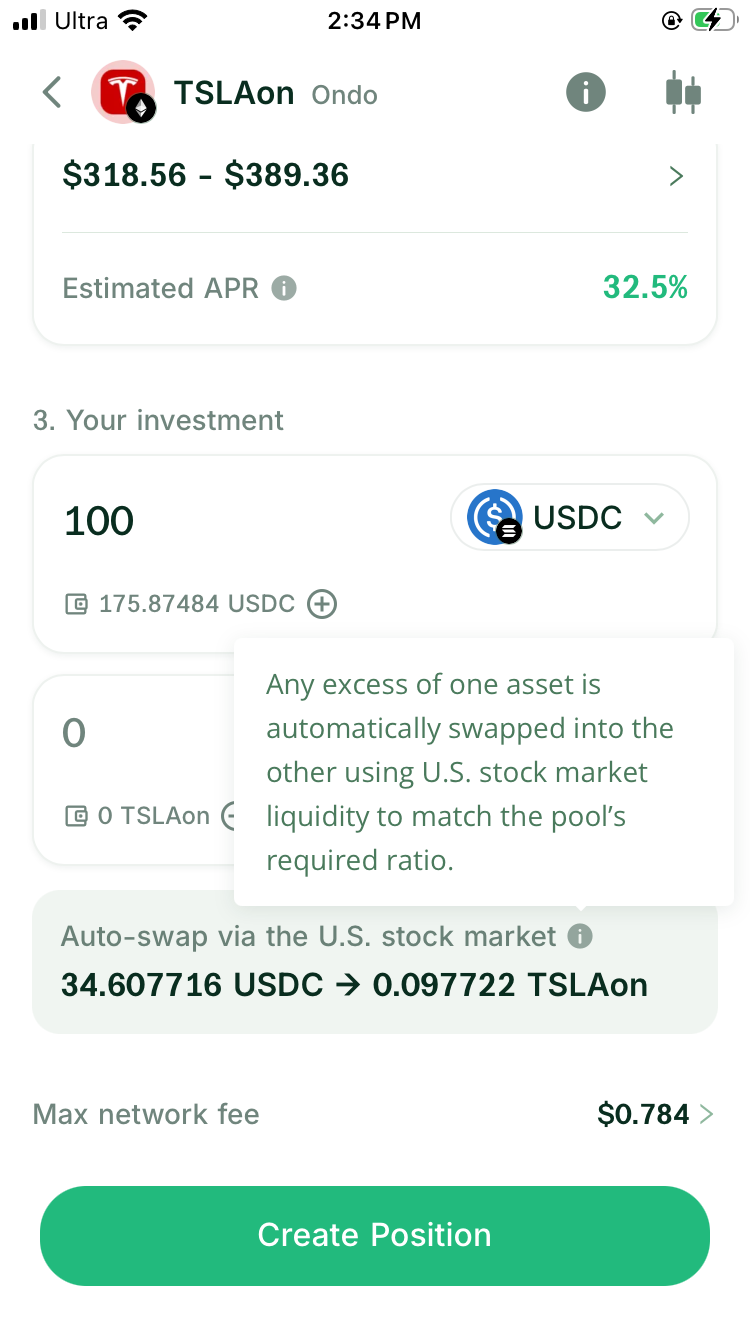
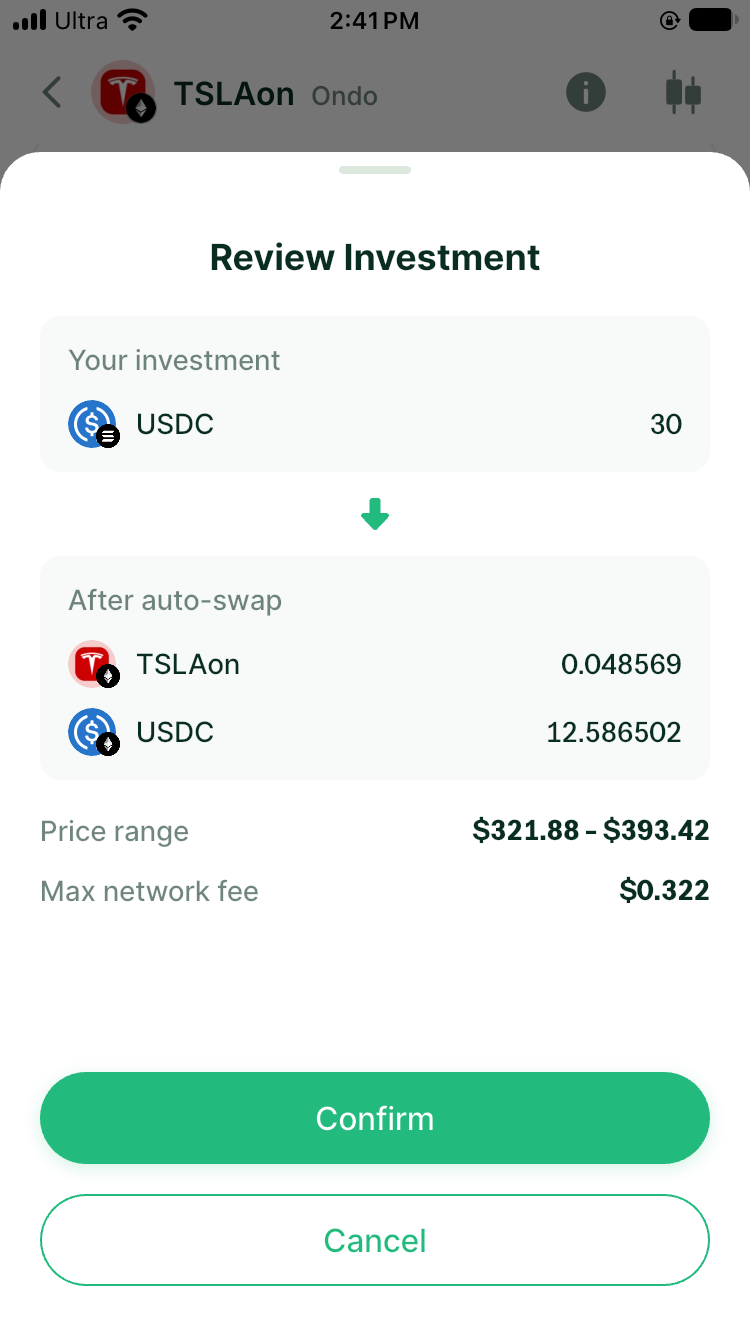
After you enter the USDC amount and choose a range, the system calculates how much stock token and USDC the position needs. A solver partner integrated with DeGate can request a current quote through Ondo’s official interface for the required conversion. The input screen labels the planned conversion Auto-swap via U.S. stock market. Continue to Review Investment to see the original input under Your investment and the resulting two assets under After auto-swap. Across these screens, check:
- your USDC input
- how much USDC goes into the conversion
- the quoted stock-token amount
- the resulting stock-token and USDC amounts shown under After auto-swap
- any spread in the conversion quote and the network fee for opening the position
Ondo’s quote service connects the tokenized asset to the price and liquidity of its corresponding stock in the traditional market. The conversion therefore does not first need to find a deep Ondo pool on-chain. The executable amount still depends on the quote and available limit returned for that order.
What does auto-swap cost?
Auto-swaps within Turbo Range do not incur DeGate’s 0.02% Swap fee. This applies to conversions needed when opening or increasing a position, whether you enter USDC alone or provide both assets and need a ratio adjustment.
Network fees and any spread in the quote still apply. Check the original input, the amounts under After auto-swap, and the network-fee estimate before confirming. Review a separate manual trade outside Turbo Range under its own fee preview.
The pool’s fee tier is a separate charge on swaps through the liquidity pool. It is not the DeGate Swap fee waived for the funding conversion.
Enter both assets when you already hold them
For two-sided funding, choose the mode containing both asset names, such as USDC + TSLAon. Use it when you already hold the selected stock token and USDC. The system uses the current price and your range to calculate how much of each asset the position requires.
If your amounts fit that requirement, they can enter the position without a conversion. If either the stock token or USDC is above the required amount, the preview may offer an auto-swap for the excess.
Consider a simplified example. You plan to deposit 1,000 USDC and some stock tokens, but the selected range needs only 800 USDC. The two-sided preview may convert the extra 200 USDC into the stock token, then show both resulting amounts under After auto-swap. The real ratio depends on the current price and range; these numbers only illustrate the flow.
Why the range changes the auto-swap amount
A concentrated liquidity position does not automatically use half of the deposit for the stock token and leave half in USDC. It calculates the required amounts from the current price’s location inside your range.
As the price rises through the range, the position gradually sells stock tokens for USDC. As the price falls, it uses USDC to acquire more stock tokens. If you open near the upper bound, the position is already near the end of the stock-selling part of the range, so it needs more USDC and fewer stock tokens. Near the lower bound, it needs more stock tokens that it can sell if the price later rises.
Consider a hypothetical example in which AAPLon is at $200:
- With a $180 to $220 range, $200 sits in the middle, so the position needs both AAPLon and USDC.
- Change the range to $180 to $205 and $200 sits near the upper bound. The position needs more USDC and less AAPLon. With one-sided funding, the flow converts less of your USDC into AAPLon.
- Change the range to $195 to $240 and $200 sits near the lower bound. The position needs more AAPLon, so one-sided funding converts more USDC into AAPLon.
These figures only explain how a range changes the asset ratio. They are not a current AAPLon quote or recommended range. Choose the range before reading the funding preview. The preview then shows why the auto-swap converts that amount. A manual 50/50 conversion can still leave the assets in a ratio that the position cannot use directly.
What happens when a quote is unavailable
Whether you can continue opening the position depends on whether the deposit needs an auto-swap.
- one-sided funding must convert part of the USDC into the stock token, so it has to wait for a quote.
- two-sided funding can enter the position without an auto-swap when the two assets already fit the required ratio.
- If two-sided funding has too much of one asset for that ratio, you can wait and let auto-swap handle the excess when quotes return. You can also reduce the amount deposited from that side, using the other available balance as the limit. The unused assets stay in your wallet, and this deposit no longer needs a conversion.
Do not identify the limiting side by comparing token counts. The current price and selected range set the ratio. The balance that cannot match more of the other asset limits how much you can deposit without a conversion.
For actions that need a fresh price reference, continue with How RFQ Liquidity and On-Chain Stock Pools Work Together.
Why the auto-swap quote changes when you change the deposit
Auto-swap handles only the part of the deposit that needs a conversion. It does not convert the full amount.
Consider a hypothetical example. You enter one asset and deposit 1,000 USDC. Based on the current price and range, the system keeps 600 USDC and uses the other 400 USDC to buy AAPLon. The RFQ is therefore for a 400 USDC conversion, not the full 1,000 USDC deposit.
If you raise the deposit to 2,000 USDC or select another range, the required AAPLon amount also changes. The system must request a new quote for the new conversion amount. Quote providers may apply per-order and current available limits for each asset, so use the new preview after changing the amount.
You do not need to calculate those limits yourself. After changing the deposit or range, review the two asset amounts under After auto-swap and the current quote status. If no quote is available, adjust the deposit or wait for quotes to return. These figures explain the flow; they are not an actual deposit ratio or current AAPLon quote.
Compare one-sided and two-sided funding
| Your situation | Start with | Check before confirming |
|---|---|---|
| You hold USDC only | one-sided funding | Quote, original input, amounts after auto-swap, and total costs |
| You hold stock tokens and USDC | two-sided funding | Available balances, any auto-swap, and unused balances |
| You want to control whether a conversion occurs | two-sided funding | Whether the preview still shows a conversion after you adjust the amounts or range |
| The position requires pool initialization | one-sided or two-sided funding | Starting price reference, opening liquidity, and network fee; Turbo Range handles this in the same flow |
One-sided funding removes a separate preparation step. Two-sided funding helps you use assets you already hold. The useful choice depends on your current balances and whether you accept the conversion shown in the preview.
Confirm an auto-swap in DeGate
- Select the stock token, fee tier, and range in Turbo Range.
- Choose one-sided or two-sided funding and enter the amount.
- Read the calculated stock-token and USDC ratio.
- If a conversion is needed, check the quote, expected received amount, and price protection.
- Check the original input, estimated amounts after auto-swap, and all displayed costs.
- Review the confirmation screen, then follow the on-screen prompt to approve and submit the transaction.
- After it succeeds, check the position details and on-chain record.
For the complete first-position flow, return to How to Open Your First Tokenized-Stock LP Position.
FAQ
Does Turbo Range charge a Swap fee on auto-swaps?
Auto-swaps within Turbo Range do not incur DeGate’s 0.02% Swap fee, including conversions needed when opening or increasing a position. Network fees and any spread in the quote still apply. Review a separate trade outside Turbo Range under its own fee preview.
Does one-sided funding leave the position in USDC only?
No. One-sided funding means that USDC leaves your wallet. The flow prepares the stock-token side, and the final position contains the stock token and USDC.
Does two-sided funding always avoid a conversion?
No. The assets can enter directly when they fit the ratio required by the selected range. An excess on either side may produce an auto-swap in the preview.
Is it better to swap manually and then enter both assets?
That depends on whether you want separate control over the purchase and whether the two-sided funding preview still needs to adjust the ratio. If your only goal is to open the position, review the complete one-sided funding quote before adding a separate swap.
Why does changing the range change the auto-swap amount?
Changing the bounds also changes where the current price sits inside the range. Near the upper bound, opening usually requires more USDC. Near the lower bound, it usually requires more stock tokens. The system recalculates the auto-swap amount from that new ratio.
Sources
Facts on this page were last verified on October 19, 2026. Product capabilities, supported assets, and fees can change; the linked sources are the current record.