
How to Claim Fees and Close a Tokenized-Stock LP Position
Task guide Last verified 2026-10-19 6 min read
Claim and Close Position both return assets to your wallet, with different results.
- Claim collects LP fees already earned and leaves the position open.
- Close Position removes the position’s liquidity from the pool and ends the position.
In the current version of DeGate Turbo Range, closing returns the assets held by the position at that time. You may receive stock tokens and USDC; the flow does not automatically swap the full result into USDC.
Use one position to separate the two actions
Suppose an AAPLon/USDC position shows:
| Item | Hypothetical value |
|---|---|
| Current status | In Range |
| Current position assets | 0.20 AAPLon and 1,018 USDC |
| Unclaimed fees | 0.004 AAPLon and 2 USDC |
| Price range | $180 to $220 |
If you select Claim, 0.004 AAPLon and 2 USDC move to the wallet. The 0.20 AAPLon and 1,018 USDC remain in the LP position, and its range stays unchanged.
If you select Close Position, the position’s liquidity leaves the pool and the listed AAPLon and USDC return to the wallet. The position then ends. It no longer participates in swaps or earns new LP fees.
Before closing, check whether the preview includes the unclaimed fees. If those assets are not listed, claim them first so that earned fees are not overlooked.
When to use Claim
Use Claim when you want to keep the same stock token, fee tier, and range while moving earned fees to your wallet.
The position continues under its original range after a claim. The current version of Turbo Range does not add claimed fees back to the position automatically. You may keep them in the wallet or add them later through a separate position action with a new preview and network cost.
Compare the claimable amount with the network fee before claiming frequently. If the fees are worth 3 USDC and the network cost approaches that amount, an immediate claim has little practical value. If fees have reached 40 USDC, the network cost takes a much smaller share. These numbers only demonstrate the decision.
You can also claim fees earned before a position went out of range. Out of Range changes whether the position earns new fees near the current price; it does not lock fees already recorded.
Claim fees in DeGate
- Open the target position in Turbo Range.
- Find
Unclaimed yieldand selectClaim. - On the Claim sheet, check the stock token and USDC under
Est. receive, along withMax network fee. - Select
Claimto continue toReview Claim. Check the amounts and refreshed network-fee estimate, then selectConfirm. - Complete the wallet verification shown on your device.
- Wait for
Claim Successful, then check both asset quantities underReceived. - Select
View Positionand check that the position remains open and the unclaimed amount has decreased. - Check the wallet balances and transaction record for the completed claim.
The screenshots below show a TSLAon claim from an example position, separate from the hypothetical AAPLon example above.
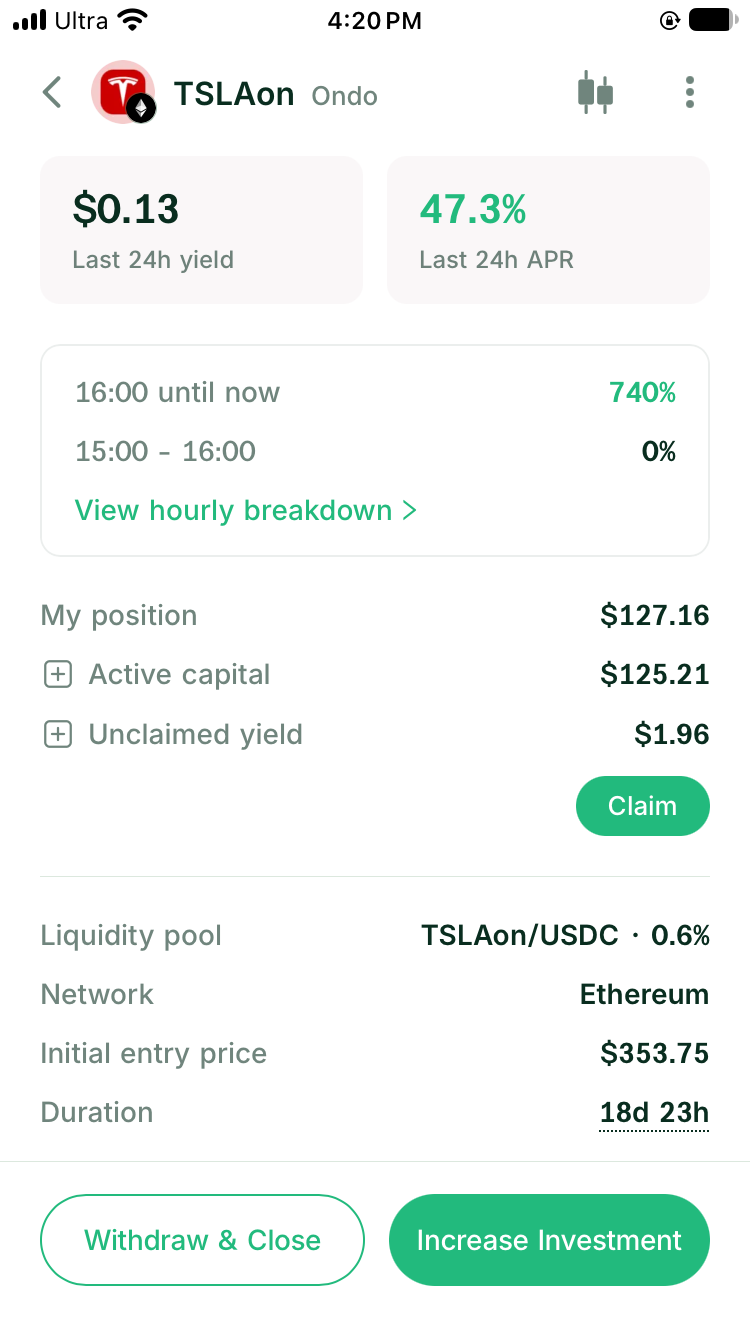
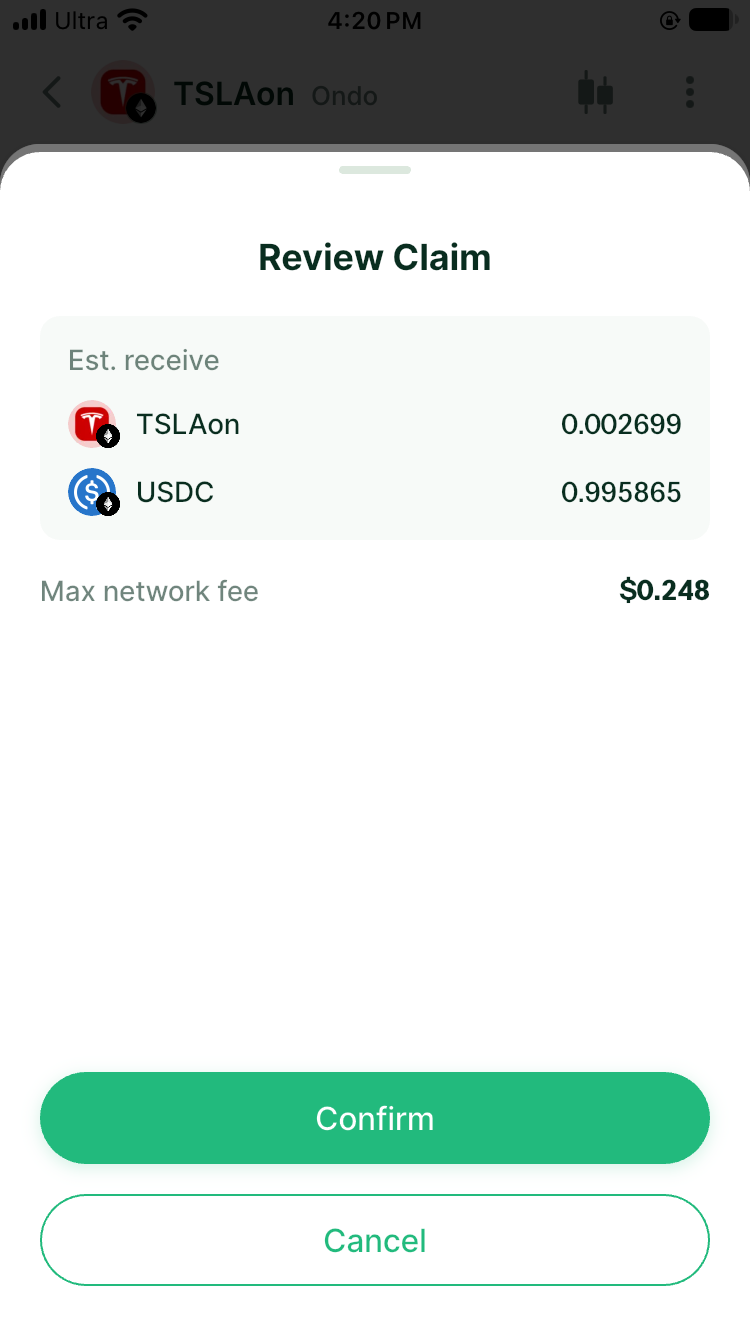
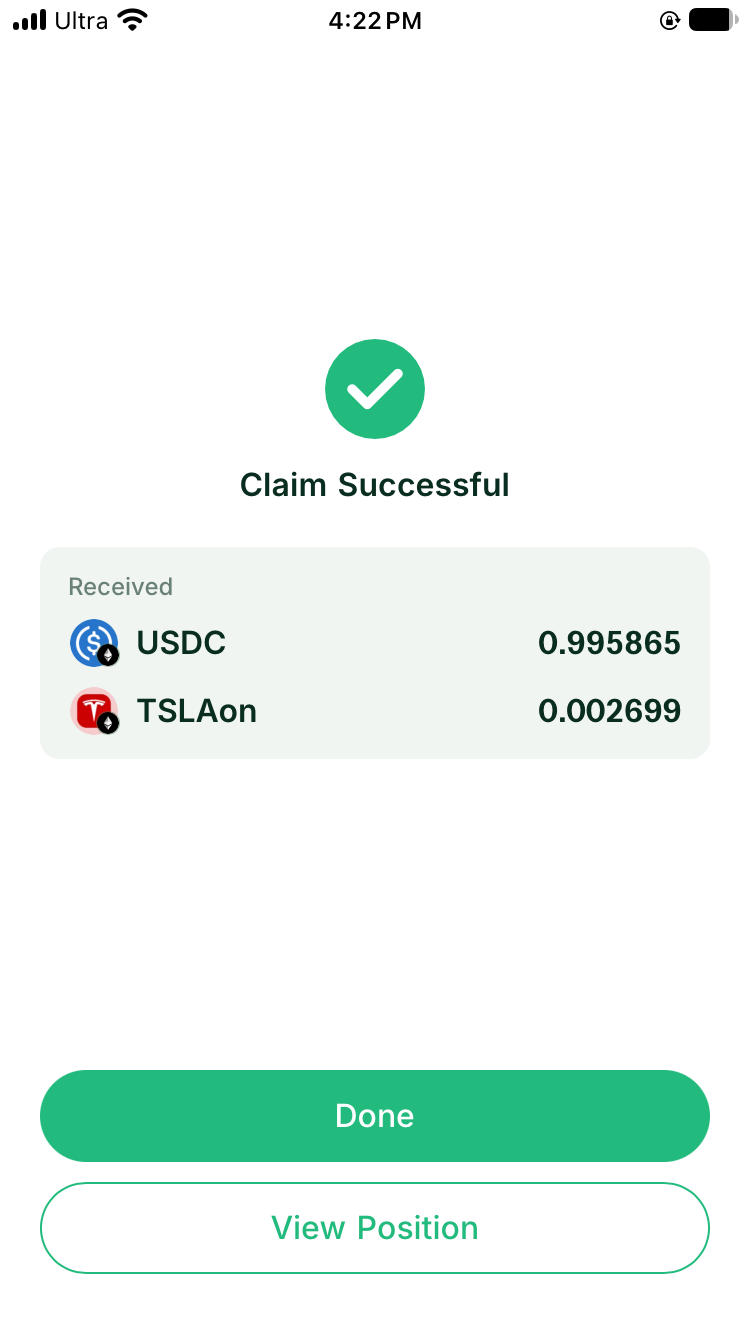
The network-fee estimate can refresh between the Claim sheet and Review Claim. Use the final preview when confirming, and the completed record when checking actual costs.
Keep a record of fees already claimed when calculating the full position result. The current unclaimed amount does not include assets moved to the wallet in earlier claims.
When to close the position
Consider Close Position when:
- you no longer want to provide liquidity for the stock token
- the original range no longer fits and you plan to reopen
- you want the position assets for holding, trading, or another DeFi action
- you no longer accept the way the position moves between stock tokens and USDC
The current version of Turbo Range does not support partial exits or editing the range of an existing position. To reduce the amount or change the range, close the full position and reopen with the new amount and settings.
Read the assets before closing
Continue the example. The closing preview may list:
- 0.20 AAPLon currently held by the position
- 1,018 USDC currently held by the position
- any unclaimed fees included in the closing operation, as shown by the final preview
- the network cost for this action
These amounts come from the position at closing and may not match the original deposit ratio. After a stock rises through the range, the position will usually hold more USDC. After a fall through the range, it will usually hold more stock tokens.
If you want to finish entirely in USDC, wait for closing to complete before deciding whether to swap the returned AAPLon. You can then review the live quote, fee, and expected USDC output for the actual amount received.
If you want to keep the AAPLon exposure, leave the returned stock token in the DeGate wallet. Closing the LP does not require selling it at the same time.
Close the position in DeGate
- Open the position and record its current assets, unclaimed fees, and range status.
- Select
Withdraw & Close. - Review the AAPLon and USDC expected back.
- Check whether the preview includes unclaimed fees. If the interface handles them separately, complete Claim first.
- Review the network cost and final expected amounts.
- Confirm and wait for the on-chain transaction to complete.
- Check the returned assets on the success page and in the wallet balances.
- Open transaction history and save the records for closing and any fee claim.
After closing, compare the success page, wallet balances, and on-chain transaction record. The on-chain record shows the actual amounts returned from the position to the wallet.
Compare the results of Claim and Close
| Action | Assets returned to the wallet | Does the position continue? | Can it earn more LP fees? |
|---|---|---|---|
| Claim | Fee assets earned and collected in this action | Yes | Yes, when the position is in range and swaps use its liquidity |
| Close Position | Stock tokens and USDC held by the position, plus fees listed in the preview | No | No, this position has ended |
If you want to move fees to the wallet each month, use Claim. If the original range is $180 to $220 and the price has settled near $230, check the assets, close, and reopen if you want a new range. If you are ending the LP entirely, no reopening action is needed.
What happens when an RFQ quote is unavailable
In the current version of Turbo Range, Claim and Withdraw & Close return assets without automatically converting the stock token into USDC. Because those actions require no conversion, an unavailable Ondo RFQ does not block them.
Quote availability matters for the next action. Swapping returned AAPLon into USDC requires an executable Trade quote. Reopening through one-sided funding or a two-sided deposit with auto-swap also depends on the quote in the new-position preview. You may leave both returned assets in the wallet until quotes resume.
FAQ
Does Claim close the position?
No. Claim collects earned fees while leaving the position’s liquidity, fee tier, and range unchanged.
Are claimed fees automatically reinvested?
The current version of Turbo Range does not provide automatic compounding. Claimed assets enter the wallet. Adding them back requires a separate increase or new position.
Does closing automatically swap stock tokens into USDC?
No. In the current version of Turbo Range, closing returns the stock tokens and USDC held by the position without automatically swapping them into USDC. If you want only USDC, review a separate swap after closing.
Can I close an out-of-range position?
Yes. Out of Range does not lock the position. Closing returns its assets according to the composition at that time.
Why is the stock-token amount different after closing?
While the price moves through the range, the pool exchanges stock tokens and USDC. Closing returns the current assets after those exchanges, so the amount may differ from the opening record.
Do Claim and Close both require a network fee?
Both are on-chain actions and normally require a network fee. Review the DeGate preview before confirming and compare the fee with the value you plan to claim or receive by closing.
Sources
Facts on this page were last verified on October 19, 2026. Product capabilities, supported assets, and fees can change; the linked sources are the current record.