
How to Buy and Hold Tokenized Stocks in a Self-Custody Wallet
Task guide Last verified 2026-09-30 7 min read
Buying an on-chain stock is similar to making a swap, but there is one extra decision at the beginning: you must choose the stock-token product, not only the company name.
In this guide, we use an Ondo stock token in DeGate as the main example. DeGate’s stock pages also identify xStocks and show the corresponding issuer in Token Info. Its broader Trade routes can reach other stock tokens when a live quote is available. The exact issuer and network matter because they determine which token arrives in your wallet and what you can do with it later.
Before you begin, prepare a DeGate wallet and enough stablecoin for the purchase. Check whether the product is available in your region. A normal DeGate swap usually does not require you to buy the destination chain’s gas token first. DeGate estimates the network cost for the full operation and, when needed, can use an eligible asset in the wallet to prepare the gas. You still pay the network fee. The preview shows the amount and payment asset for the current order. Hardware wallets and a small number of special transactions may still require native gas at the address.
1. Open Stocks and search for the exact token name
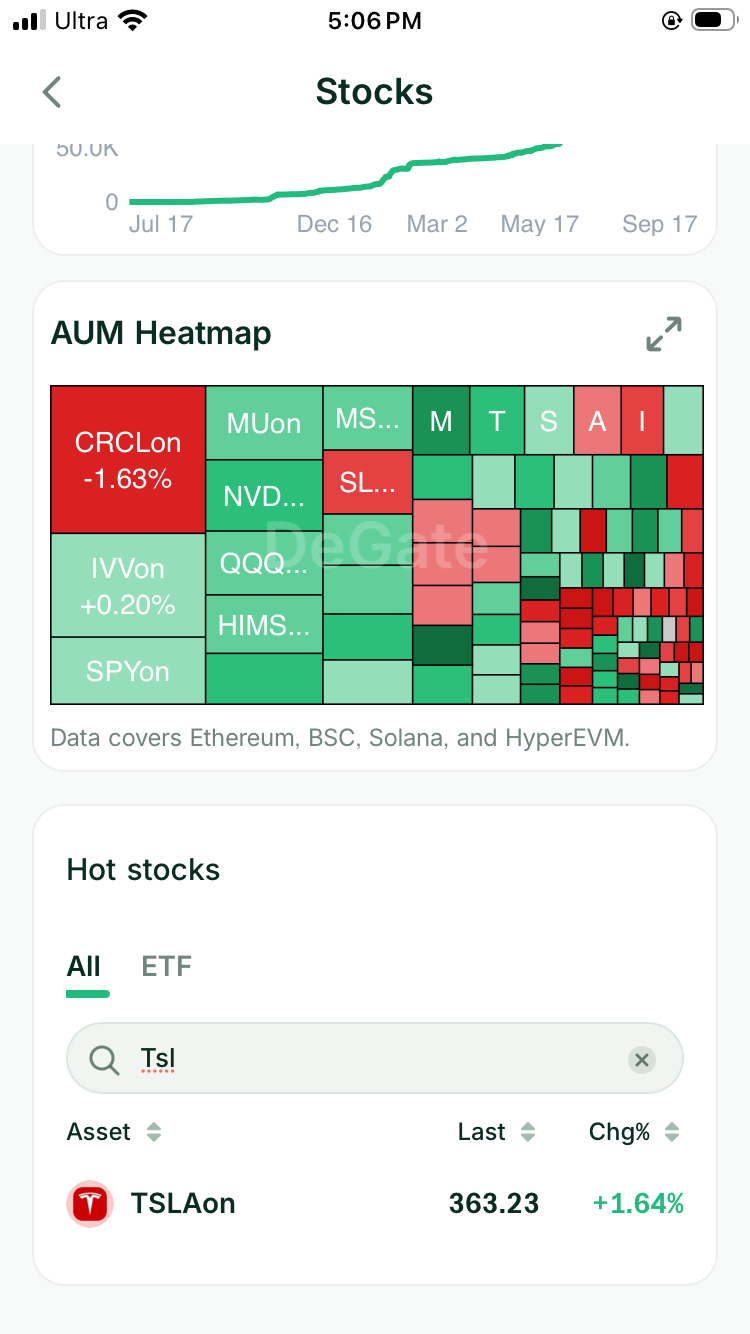
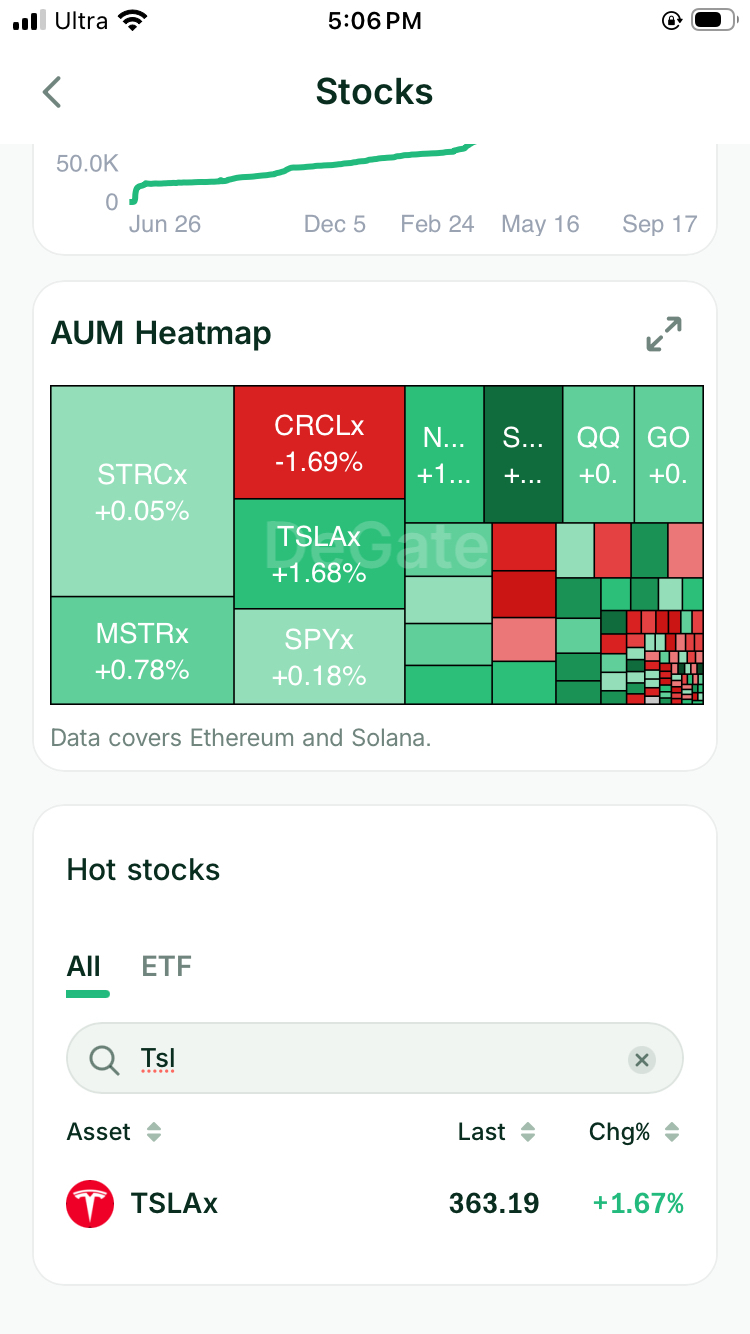
Open the Stocks section in DeGate and choose the issuer list first. Ondo and xStocks have separate asset lists and separate searches. Search within the relevant list using the exact token symbol. For Tesla exposure, for example, the Ondo list returns TSLAon, while the xStocks list returns TSLAx.
Do not choose by logo alone. Check which issuer list you opened, then read the full token symbol before continuing. The suffix helps distinguish the product: on identifies the Ondo token in this example, while x identifies the xStocks token. Confirm the issuer, network, and contract again in Token Info.
2. Open Token Info before entering an amount
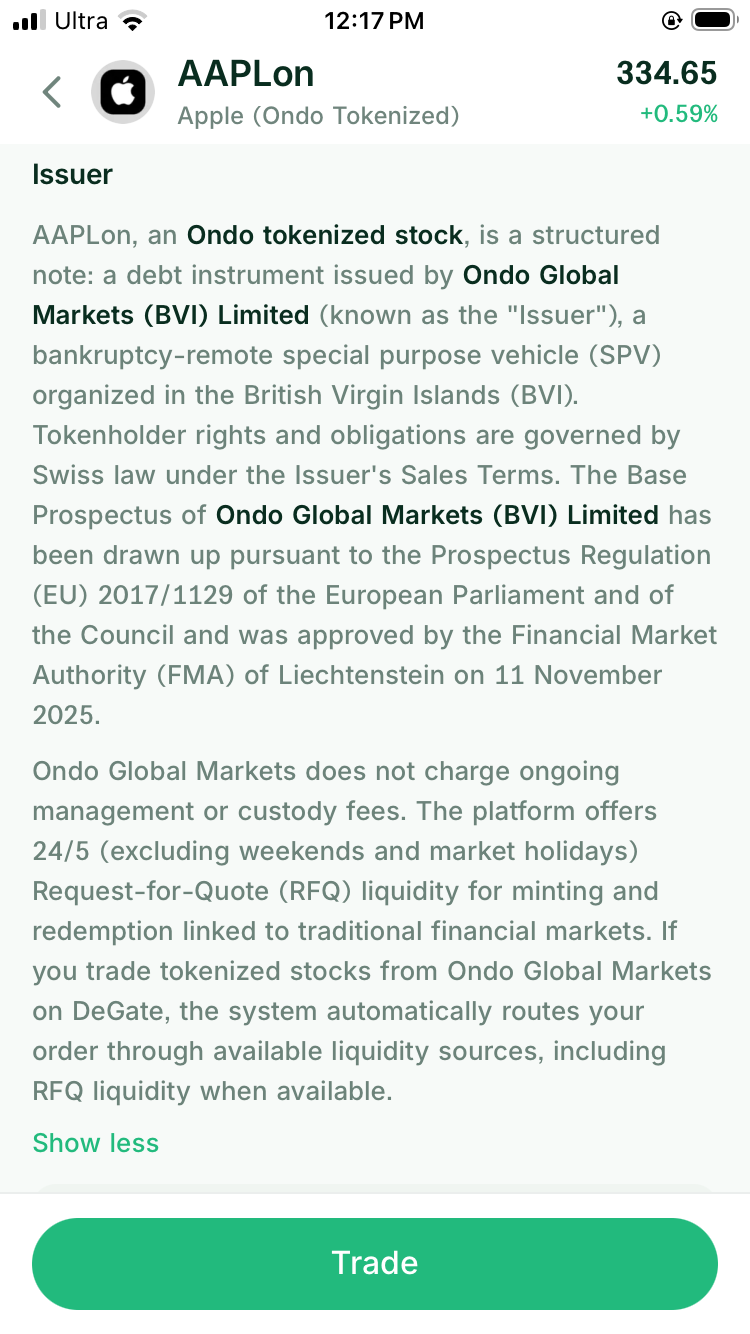
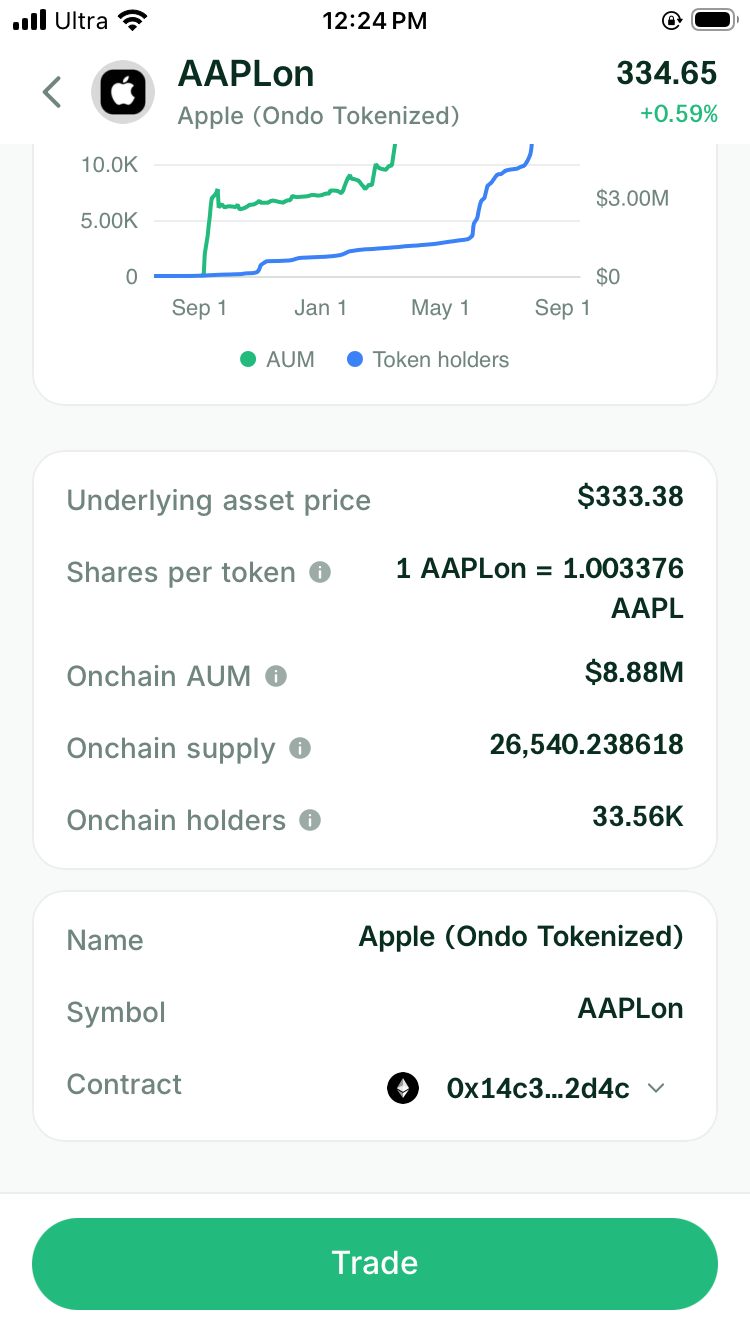
Tap the asset and open Token Info. Check the full token name, issuer, underlying stock or ETF, network, and contract address.
The contract address is the token’s unique on-chain identity. Two assets can use the same familiar stock ticker while having different contracts. In practice, checking the contract keeps you from buying the wrong issuer’s version or a copy with a similar name.
Use the issuer’s official asset list to confirm the address. If you want a deeper review of backing, holder rights, redemption, and dividends, follow How to Verify a Tokenized Stock Before You Buy.
3. Enter the amount you want to buy
Return to the trade screen and enter how much stablecoin you want to spend. Starting with a small amount makes the first transaction easier to check. It also lets you see how the token appears in your wallet before you move a larger balance.
The market price on the asset page gives you a general idea of the stock’s value. The trade preview is more useful for the purchase itself because it uses your actual order size.
4. Read the live quote
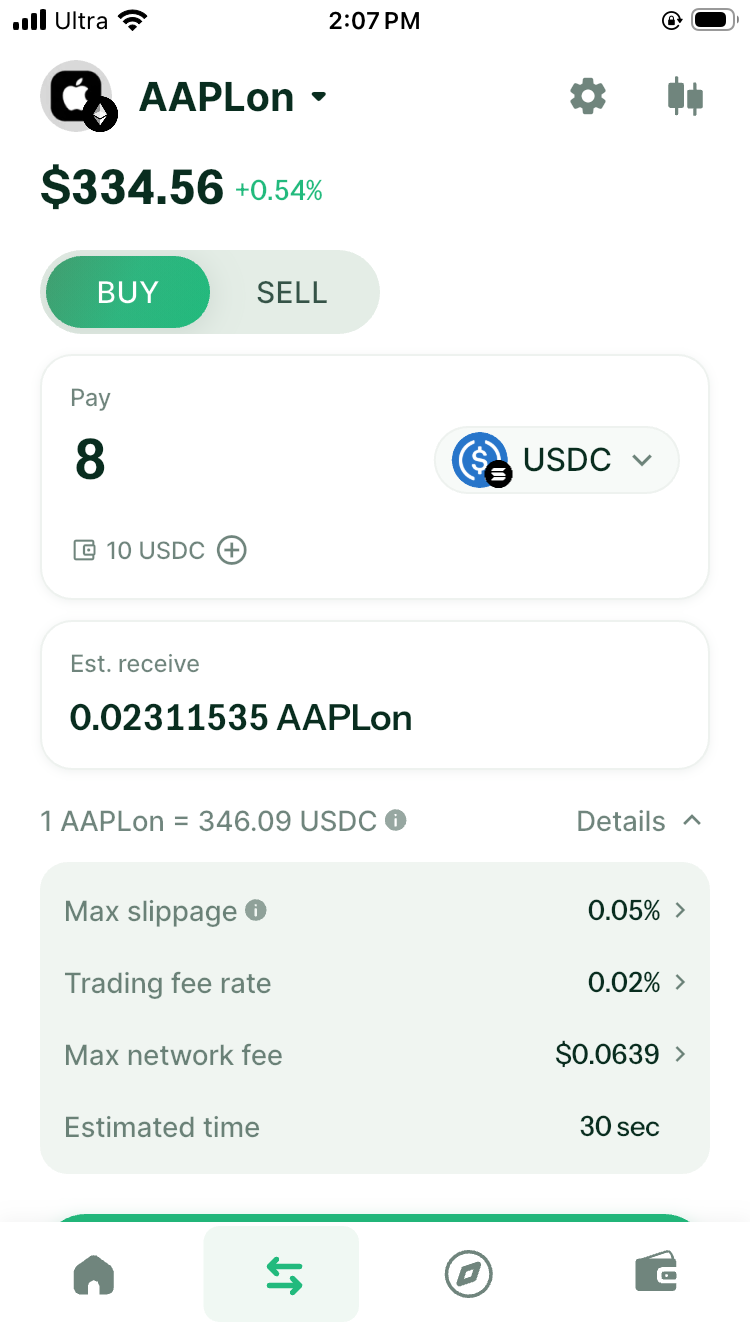
The preview should tell you how many stock tokens you expect to receive and what the trade will cost. Check:
- the asset you are paying
- the stock token and amount you will receive
- the network
- fees and network cost
- slippage or price protection
- how long the quote remains valid
For an Ondo order, a solver partner integrated with DeGate can send a Request for Quote (RFQ) for that specific amount through Ondo’s official API. Ondo prices the order using the price and available liquidity of the corresponding stock in the traditional US market. This means the trade does not first need to find an Ondo pool with enough money on-chain. When the RFQ route is available, it can offer more depth than relying only on a single on-chain pool, particularly for a larger order.
RFQ still has its own limits. The Ondo market must be open, the order must fit the applicable limit, and the executable quote remains valid for a limited time. If RFQ is unavailable, DeGate can compare other routes that can execute at that moment.
This is why the final quote can differ slightly from the price shown on the market page. The quote includes the route, order size, spread, and current trading conditions. How to Check a Tokenized-Stock Quote Before You Buy explains these fields in more detail.
5. Confirm the trade and verify it
If the preview matches the trade you intended, tap Buy or Sell. DeGate then opens a Verify sheet. On an iPhone, you can confirm with Touch ID or use the wallet password instead. This check confirms that you authorized the current trade. A normal swap does not ask you to work through a series of separate blockchain signature dialogs.
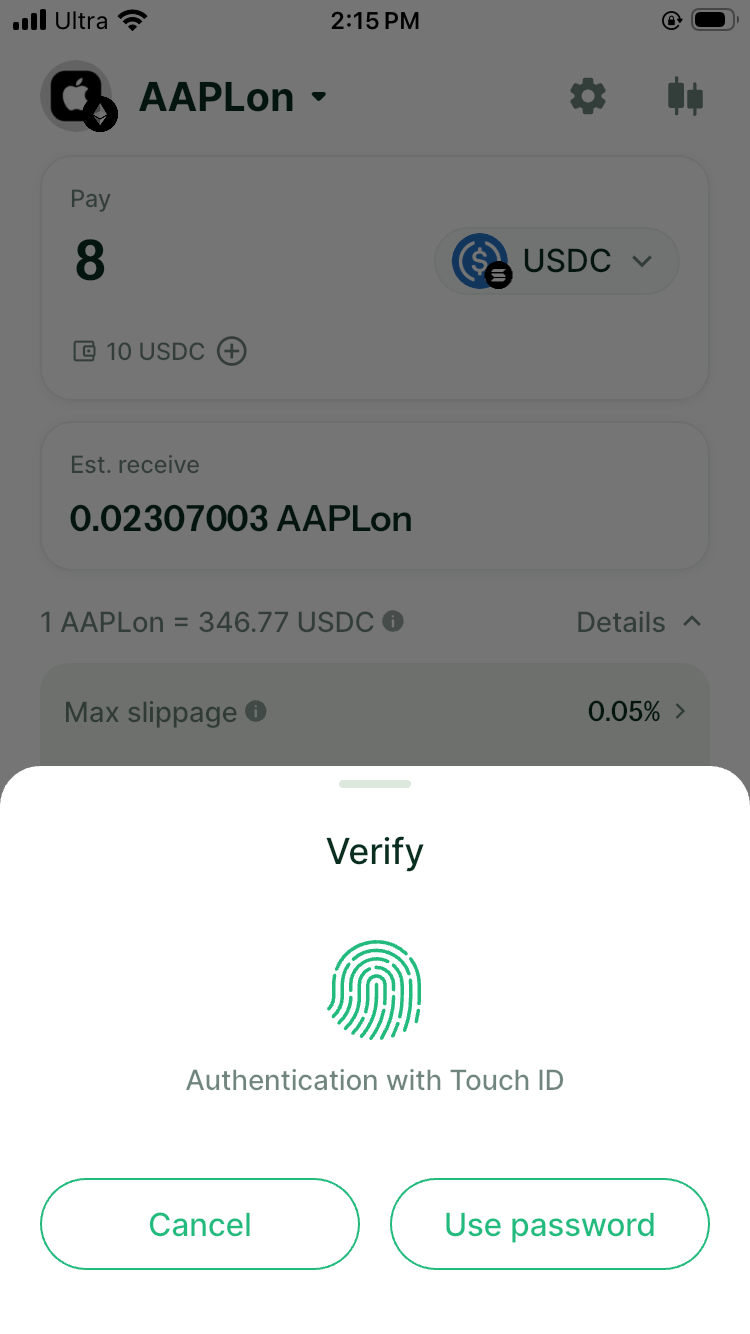
After verification, keep the app open until it shows the result. A submitted transaction may need time to confirm on the network. If it fails, read the reason before trying again. An expired quote, insufficient balance, an unavailable network-fee payment, or a temporary market pause can each require a different next step.
6. Check what arrived
Open the wallet balance after the transaction completes. Confirm the token name, issuer, network, amount, and transaction record.
This final check answers a simple question: did the token you selected actually arrive? It also creates a record you can use later when you sell, reconcile a dividend, or enter an LP.
If the token uses a multiplier or scaled-balance mechanism, the number displayed by a wallet can depend on its current implementation. Compare the wallet with the issuer’s own record if the amount looks different from what you expected.
Holding the token after purchase
Once the token is in your self-custody wallet, you decide when to move or use it. You can restore the same wallet on another device, connect it to an on-chain application, or use a hardware-wallet setup for longer-term storage.
You should still keep the issuer documents and contract address with your investment notes. Self-custody gives you control of the on-chain account. The issuer’s rules still determine eligibility, redemption, and how dividends or stock splits are handled.
In DeGate, you can return to the asset page when you want a sell quote. If Turbo Range supports the exact token for LP use, you can also continue into a stock LP from the same wallet. Eligible Ondo assets on Ethereum use the same Turbo Range position flow regardless of the underlying pool state.
Common first-purchase mistakes
- Choosing a familiar ticker without checking the issuer
- Buying on one network while expecting to use a market on another
- Treating the market-page price as the final trade result
- Ignoring the Max network fee and the asset selected to pay it
- Sending a large amount before checking how the first small trade appears
- Assuming every stock token has a lending or LP market
FAQ
Can I buy an Ondo stock token in DeGate?
Eligible users can find Ondo assets in DeGate and request a live quote. When the route is available, a solver partner integrated with DeGate can request an RFQ through Ondo’s official API. Check the exact asset, network, amount, and final quote in the app.
Can I also buy xStocks in DeGate?
Yes. DeGate’s stock pages also identify xStocks and show the corresponding issuer information. xStocks and Ondo are separate products, so compare their network, contract, dividend treatment, and later DeFi use before choosing.
Do I need ETH to buy an Ondo asset on Ethereum?
For a normal trade in DeGate, you usually do not need to buy ETH first. DeGate calculates the network fee and, if the wallet does not have enough ETH, can select an eligible balance to prepare the gas required for the transaction. You still pay the network fee, but you do not need to make a separate ETH top-up first. The final preview shows the Max network fee and current payment method. Where the product allows it, you can change the token used to pay that fee. Hardware-wallet users manage gas at their own address, and some transactions involving a native gas asset may still require ETH there. Check the current order preview before confirming.
Is the token in my wallet the same as a registered brokerage share?
Not necessarily. A stock token can provide economic exposure through an issuer’s legal structure without registering you as a shareholder of the underlying company. Read the issuer documents for the exact rights.
What should I do immediately after buying?
Check the token, network, contract, amount, and transaction record. Also make sure you know where to request a sell quote and where the issuer publishes dividend or stock-split notices.
Sources
Facts on this page were last verified on September 30, 2026. Product capabilities, supported assets, and fees can change; the linked sources are the current record.