
Turbo Range LP income comes from pool trading fees. Your position receives a share when the price is within your selected range and trades actually use its liquidity. The APR shown in the app is an annualized estimate based on historical activity. To assess your result after opening, combine fees you have claimed with the current value of the stock token and USDC in the position.
How much might I earn?
There is no fixed amount. For example, on 6 November 2026, a TSLAon/USDC setup in the app selected a $321.88–$393.42 range and displayed a 34.3% estimated APR based on the previous 30 days. That APR used data available for that setup at the time. It can help compare ranges, while fees you actually receive depend on later trading volume, other LPs in the pool, and price movement. Review both claimed fees and total position value when measuring the outcome.
The opening confirmation shows your deposit, the two assets after any automatic swap, the selected price range, and estimated network cost. The screenshot below illustrates that screen; its figures apply only to that example.
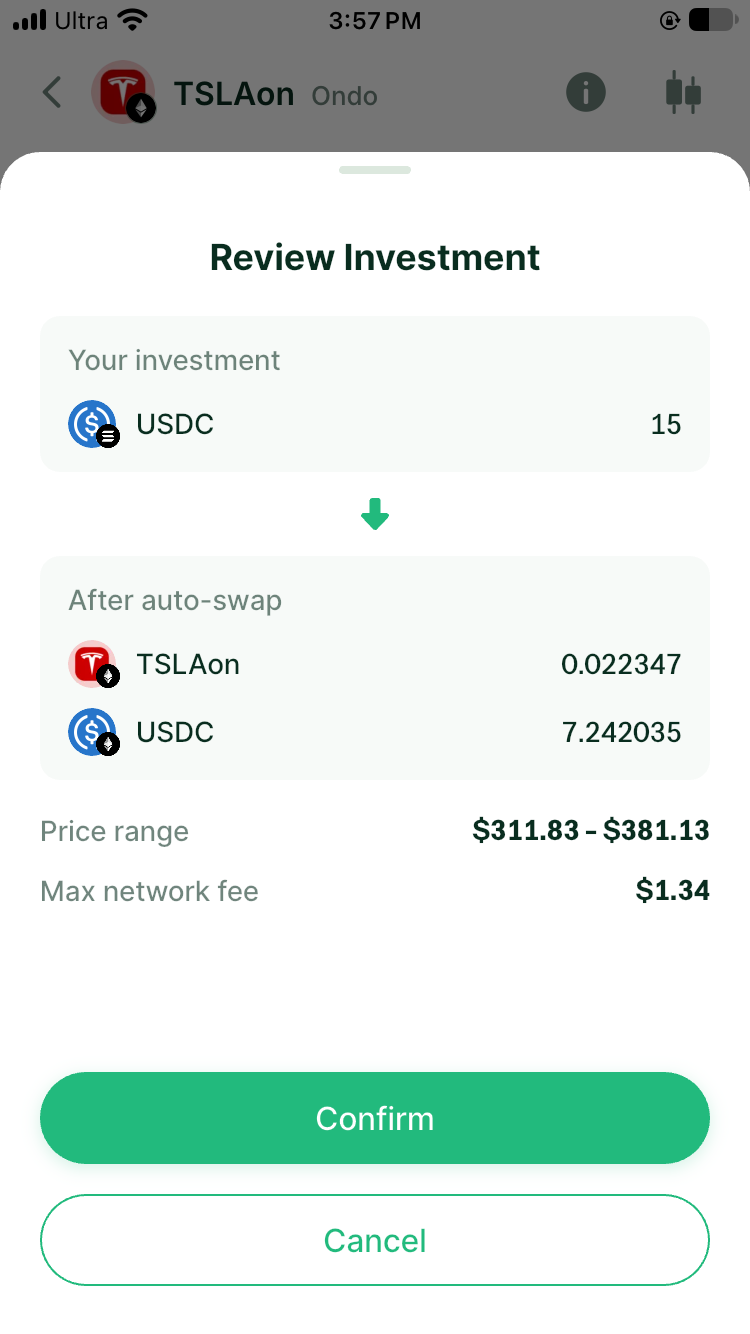
App screenshot, 6 November 2026: confirmation before opening a position.
What can reduce my result?
As the market price changes, so does the position's mix of stock tokens and USDC. Even after earning fees, the whole position can be worth less than simply holding the starting assets. Outside the selected range, it remains open but normally stops earning new trading fees at the current price. Opening and exiting also involve gas, swap spreads, token risk, and smart-contract risk. You cannot currently edit an existing position's range or fee tier in place; to change them, close the old position and open a new one.
A narrow range concentrates liquidity but may move out of range more easily. Lower pool volume or more LPs sharing trades can also reduce your fees. Evaluate claimed fees plus the current value of both assets. See the APR guide and pre-deposit checklist.
Can I close a position after the price leaves my range?
Yes. A price outside your range does not lock the position. You can view and close it under My Positions. Closing returns whichever assets the position holds at that time, possibly mostly one token; review the closing preview first. You can also leave the position open and reassess if the price changes, although it normally earns no new trading fees while out of range.