
You can open with USDC alone. Closing cannot currently convert everything to USDC in one step. With a single-asset deposit, the opening flow prepares the stock token needed for your range and shows the automatic swap result before you sign. You can also deposit both assets in the ratio needed by the pool. Check the final contribution, swap quote, and network fee before opening.
When you close, your wallet receives the assets then held by the LP, possibly both stock tokens and USDC. If you want only USDC, close first and request a separate sell quote for the returned stock tokens in Trade. That second transaction has its own fee, execution price, and quote availability.
What is the difference between Claim and Close Position?
Claim transfers accrued fee assets to your wallet while the LP stays open. Claimed fees are not automatically reinvested. Withdraw & Close removes liquidity, returns the position assets, and ends the position. Review the returned assets and any unclaimed fees in the closing preview.
Open a position under My Positions to see unclaimed earnings and the separate Claim and Withdraw & Close actions. Decide whether you want to collect fees or leave the whole position before selecting an action.
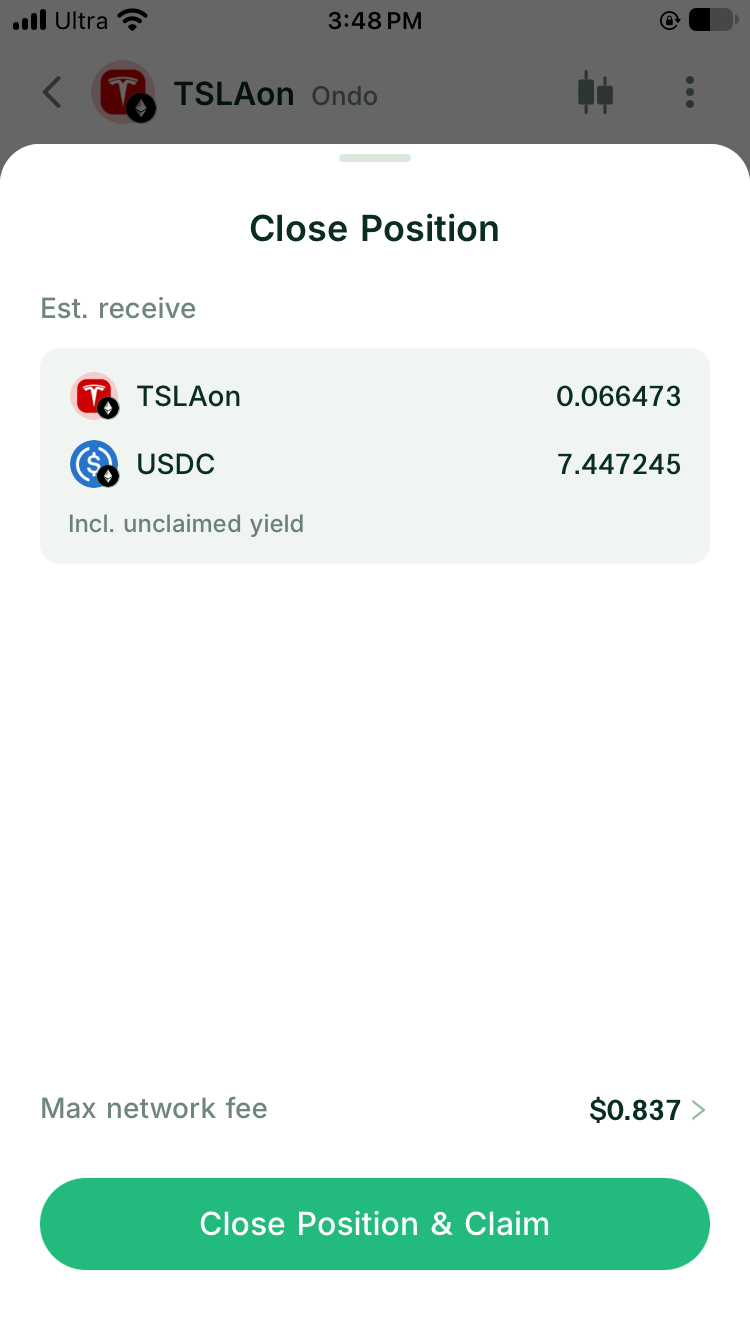
App screenshot, 6 November 2026: closing confirmation. Amounts and network fee are from that example.